> For the complete documentation index, see [llms.txt](https://www.pwny.cc/llms.txt). Markdown versions of documentation pages are available by appending `.md` to page URLs; this page is available as [Markdown](https://www.pwny.cc/so/ai/evasion/exercise-2.md).
# Exercise 2
Carlini L2 Attack
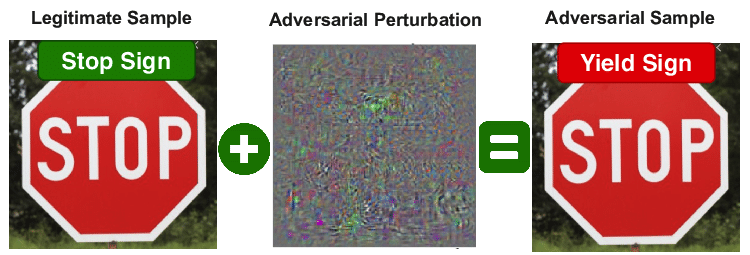
**KEY IDEAS:** Rather than optimizing the model parameters, we will modify the input image. We will use existing optimization tools such that we
1. Modify the input image to either *maximize* the classification loss function with respect to the correct label (untargeted attack) or *minimize* the classification loss function with respect to a label other than the original (targeted attack).
2. Minimize the distance between the evasive image and the original image, to avoid the pertubations being overly noticable to the human eye.
## Model
{% code overflow="wrap" %}
```python
import torch
from PIL import Image
from IPython import display
import pandas as pd
import torchvision
from torchvision import transforms
import numpy as np
import matplotlib.pyplot as plt
device = torch.device('cuda' if torch.cuda.is_available() else 'cpu')
print(device)
#load the model from the pytorch hub
model = torch.hub.load('pytorch/vision:v0.10.0', 'mobilenet_v2', weights='MobileNet_V2_Weights.DEFAULT', verbose=False)
# Put model in evaluation mode
model.eval()
# put the model on a GPU if available, otherwise CPU
model.to(device);
# Define the transforms for preprocessing
preprocess = transforms.Compose([
transforms.Resize(256), # Resize the image to 256x256
transforms.CenterCrop(224), # Crop the image to 224x224 about the center
transforms.ToTensor(), # Convert the image to a PyTorch tensor
transforms.Normalize(
mean=[0.485, 0.456, 0.406], # Normalize the image with the ImageNet dataset mean values
std=[0.229, 0.224, 0.225] # Normalize the image with the ImageNet dataset standard deviation values
)
]);
def tensor_to_pil(img_tensor):
# tensor: pre-processed tensor object resulting from preprocess(img).unsqueeze(0)
unnormed_tensor = unnormalize(img_tensor)
return transforms.functional.to_pil_image(unnormed_tensor[0])
unnormalize = transforms.Normalize(
mean= [-m/s for m, s in zip([0.485, 0.456, 0.406], [0.229, 0.224, 0.225])],
std= [1/s for s in [0.229, 0.224, 0.225]]
)
# load labels
with open("../data/labels.txt", 'r') as f:
labels = [label.strip() for label in f.readlines()]
# load an example image
img = Image.open("../data/dog.jpg")
plt.imshow(img)
plt.axis('off')
plt.show()
# preprocess the image
img_tensor = preprocess(img).unsqueeze(0)
print(f"Inputs information:\n---------------\nshape:{img_tensor.shape}\n")
# move sample to the right device
img_tensor = img_tensor.to(device)
with torch.no_grad():
output = model(img_tensor)
print(f"Image tensor on device:\n---------------\n{img_tensor.device}\n")
print(f"Inputs information:\n---------------\nshape:{img_tensor.shape}\nclass: {type(img_tensor)}\n")
print(f"Shape of outputs:\n---------------\n{output.shape}\n")
print(f"Pred Index:\n---------------\n{output[0].argmax()}\n")
print(f"Pred Label:\n---------------\n{labels[output[0].argmax()]}\n")
unnormed_img_tensor= unnormalize(img_tensor)
img_pil = transforms.functional.to_pil_image(unnormed_img_tensor[0])
img_pil.show()
```
{% endcode %}
## Exercise
Okay - time to kick you out of the nest a little bit - recreate the attack from above
1. Set the `current_index`
2. Wrap the optimization in loop
3. Observe the final image and collect the final label
## Solution
#### Summary
First, a mask is created with random noise, which is then optimized using an Adam optimizer. This mask is applied to the original image, creating a modified version that attempts to shift the model’s prediction to a different class. A loss function is defined to minimize classification accuracy for the original label while also controlling the mask’s magnitude. The optimization loop runs until the model misclassifies the modified image, effectively demonstrating an adversarial attack.
1. **Generate the Mask**
We first initialize a mask that will be used to perturb the image. In the image above, this is the middle figure. We will initialize it as random noise from a normal distribution, and then modify it until our loss function is optimized.
```python
# define how much we want to change the image
# the larger this is, the more strongly the mask will be applied to the original image
change = 1e-3
# create new img_tensor
img_tensor = preprocess(img).unsqueeze(0)
# create the halloween mask
mask = torch.randn_like(img_tensor) * change
# turn in into something torch can work with
mask_parameter = torch.nn.Parameter(mask)
# create the final dog + noise
masked_img_tensor = img_tensor + mask_parameter
print(f"Mask shape:\n---------------\n{mask.shape}\n")
```
* [`torch.randn_like`](https://pytorch.org/docs/stable/generated/torch.randn_like.html#torch-randn-like): Takes in a tensor and returns a tensor of the same shape that is filled with random numbers from a normal distribution with mean 0 and variance 1.
* [`torch.nn.Parameter(mask)`](https://pytorch.org/docs/stable/generated/torch.nn.parameter.Parameter.html#torch.nn.parameter.Parameter): This takes our `mask` tensor and turns it into a learnable parameter that Pytorch can optimize during training. Remember, we are optimizing the mask itself, not the model parameters. This sets that up.
{% code overflow="wrap" %}
```python
img_tensor = img_tensor.to(device)
masked_img_tensor = masked_img_tensor.to(device)
with torch.no_grad():
output = model(img_tensor)
masked = model(masked_img_tensor)
probs = torch.softmax(output, dim=1)[0][output[0].argmax()].item()
mask_probs = torch.softmax(masked, dim=1)[0][masked[0].argmax()].item()
prediction = labels[output[0].argmax()]
mask_prediction = labels[masked[0].argmax()]
img_pil = tensor_to_pil(img_tensor)
masked_pil = tensor_to_pil(masked_img_tensor)
plt.figure(figsize=(10, 5)) # Adjust the figsize as needed
plt.subplot(1, 2, 1)
plt.imshow(img_pil)
plt.title(f"Original Image\nPrediction: {prediction}, Probability: {probs:.2f}")
plt.axis('off')
plt.subplot(1, 2, 2)
plt.imshow(masked_pil)
plt.title(f"Masked Image\nPrediction: {mask_prediction}, Probability: {mask_probs:.2f}")
plt.axis('off')
plt.show()
```
{% endcode %}
* `.to(device)`: All operations in PyTorch must be done on tensors that are on the same device. In most cases here, this is the GPU that we have available.
* [`torch.no_grad`](https://pytorch.org/docs/stable/generated/torch.no_grad.html#no-grad): Disables the gradient calculation. We are only doing inference on an already trained model here, so we are only doing "forward pass" computations. Using this means we do not build a computational graph for the operations within the context and therefore **save on memory**.
{% code overflow="wrap" %}
```python
l2_norm = torch.norm(img_tensor - masked_img_tensor, p=2)
print("Distance (L2 norm) between original image and masked image:\n---------------\n", l2_norm.item())
```
{% endcode %}
* **"What do we mean when we talk about the distance between images?"** If you're a visual learner, you may find [this tool](https://distill.pub/2019/activation-atlas/) helpful. At each layer, this is a visualization of the activations that a neural network has learned about images for classification. While it doesn't directly translate to "distance" as we are thinking about it here, it may be helpful to wrap your mind around the concept of the distance between vectorized representations of images. Our model isn't actually seeing the images - it's seeing the numerical representation of those images as tensors, between which we can compute distance like we would for any vector.
2. **Build the Optimizer**
{% code overflow="wrap" %}
```python
# parameters let the optimizer know how to update them (rather than just tensors, which you have to manage by hand)
mask_parameter = torch.nn.Parameter(mask.to(device))
# set the target to our mask, not the model
optimizer = torch.optim.Adam([mask_parameter])
# Find our current prediction
current_index = model(img_tensor)[0].argmax().unsqueeze(0)
```
{% endcode %}
* [`torch.optim.Adam([mask_parameter])`](https://pytorch.org/docs/stable/generated/torch.optim.Adam.html#adam): This sets the target of our optimization to be the `mask_parameter` tensor. It's telling PyTorch that this object in particular is what we are changing in order to optimize our loss function. It also specifies the `Adam` algorithm as our choice for optimization. If you want to know the magic math it's doing, check out the PyTorch docs.
* `model(img_tensor)[0].argmax().unsqueeze(0)`:
* `model(img_tensor)` returns a tensor of shape (`batch_size`, `num_classes`) where `num_classes` is the number of possible classifications. The values in this tensor are logits (think "scores") for each class.
* `model(img_tensor)[0]` we have a batch size of 1, so we only care about the first set of logits.
* `model(img_tensor)[0].argmax()` returns the index of the highest logit, in other words the index of the class with the highest score, or our model's prediction.
3. **Define the loss function**
{% code overflow="wrap" %}
```python
def loss_function(output, mask, current_index):
# note the negative here! We want the loss when the output does _not_ match the current index to be small.
# usually when the two don't match, the loss is large; adding the negative sign makes it negative (thus: small)
classification_loss = -torch.nn.functional.cross_entropy(output, current_index)
# this says "No single pixel should be big, and the total magnitude of all of them should be small"
l2_loss = torch.pow(mask, 2).sum()
total_loss = classification_loss + l2_loss
return total_loss, classification_loss, l2_loss
```
{% endcode %}
4. **Final part**
{% code overflow="wrap" %}
```python
# the index of the class of our image's current model inference
# should be 235: German Shepherd
current_index = model(img_tensor)[0].argmax().unsqueeze(0)
# Loop until we've classified the manipulated image as something else
while True:
# Compute the logits of the perturbed image with the current mask_parameter
output = model(img_tensor+mask_parameter)
# Compute the loss(es) given the current inference and the original img index
total_loss, class_loss, l2_loss = loss_function(output, mask_parameter, current_index)
# reset the optimizer's gradient to zero before backpropagation
optimizer.zero_grad()
# compute the gradients with respect to the loss and the mask_parameter
# remember that the optimizer's target is the mask_parameter, not the model params
total_loss.backward()
# update the mask_parameter values based on the computed gradients
optimizer.step()
print("Total loss: {:4.4f} class loss:{:4.4f} l2 loss: {:4.4f} Predicted class index:{}".format(
total_loss.item(), class_loss.item(), l2_loss.item(), output[0].argmax()
))
# have we achieved misclassification?
if output[0].argmax() != current_index:
break
print(f"Winner winner: {labels[output[0].argmax()]}")
```
{% endcode %}
{% embed url="" %}
{% embed url="" %}
{% embed url="" %}